Start
Prerequisite
Installation Steps
- Download Installer Package
- Open Unity and Open Installer Package
- After adding installer addon, restart editor.
- GLTFast will be download automatically
- Newtonsoft
Installation
Copy the SketchfabWrapper folder to Assest folder;
Required setup before using the library
- Enter your Client ID and Client Secret
Steps
- Create an Sketchfab folder inside the Assets folder in your unity project
- Create a Resources folder inside your new Sketchfab Folder (Sketchfab/Resources)
- Navigate to Sketchfab/Resources (inside Unity)
- Right Click > Create > SketchfabSettings
- Add your Client ID and Client Secret into the SketchfabSettings.
- Login in your Sketchfab account
Steps
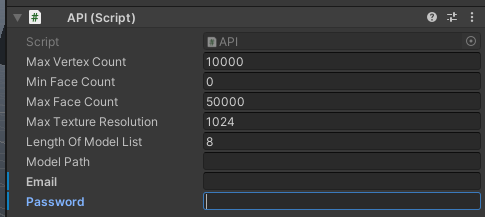
- Navigate to Assets/Sketchfab and drag "_SCRIPT" prefrab to the scene
- Enter your Sketchfab's username and password on inspector of the "_SCRIPT"